ERP Implementation Project Plan Components
A plan covers scope, budget, risks, and governance—not just when things happen.
- Written by
- Leila Vidal
- Updated
- September 17, 2026
- Reading time
- 12 min read
- Sources cited
- 4 sources ↓
What this covers
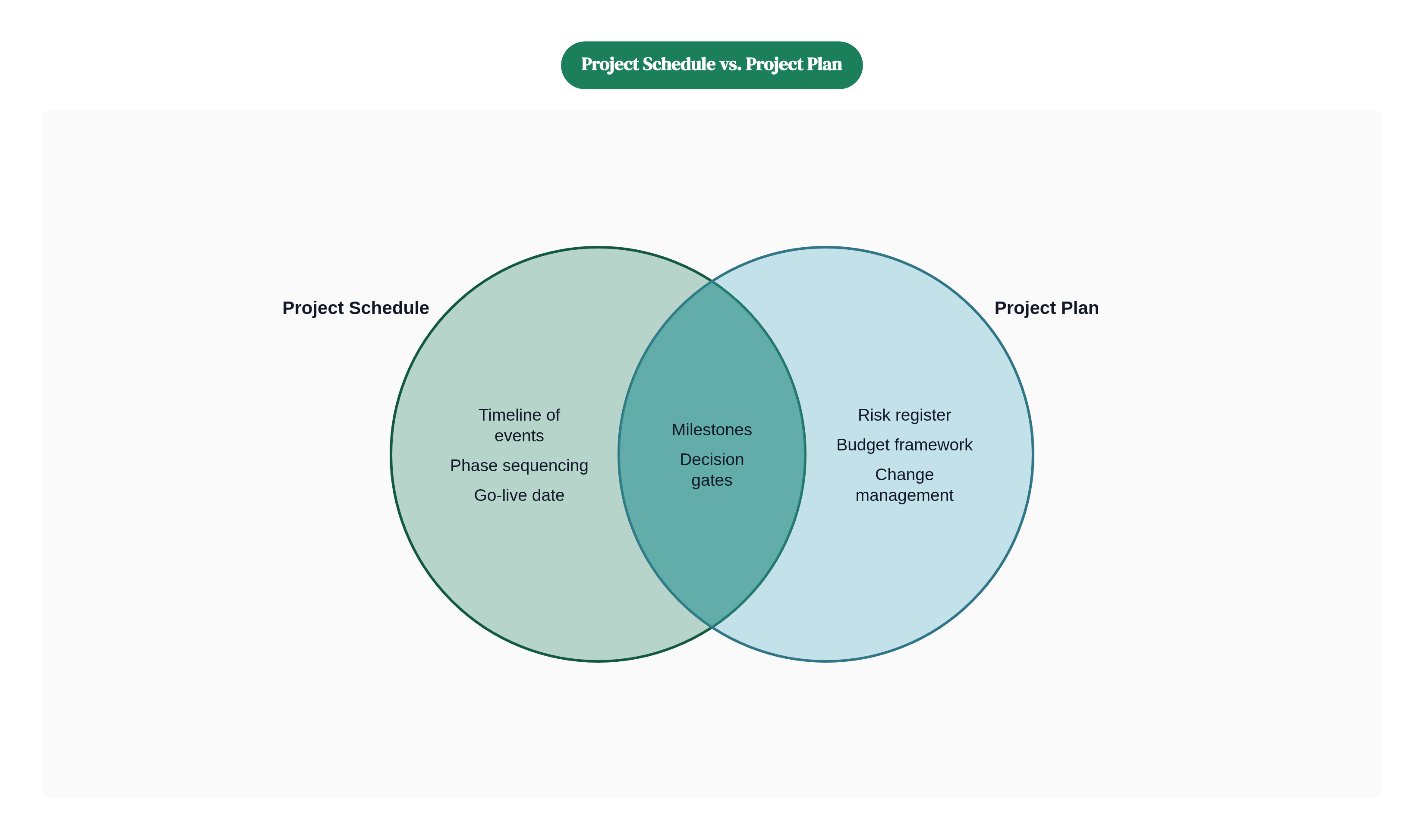
People conflate a project schedule with a project plan. They are not the same thing.
A schedule tells you when things happen. A project plan tells you what you're doing, who's responsible, what it costs, what the risks are, what success looks like, and what happens when things go sideways. Which they will.
A solid ERP implementation plan functions as several documents at once:
- A governance document that defines who makes what decisions
- A scope boundary that says explicitly what is in and what is out
- A budget framework broken down by category, not just total spend
- A risk register that anticipates problems before they become problems
- A change management anchor that keeps the people side from becoming an afterthought
Before the project moves forward, the plan must produce:
- Defined scope, including what is explicitly excluded
- A phase-by-phase timeline with milestones and decision gates
- Budget allocation across technical, workforce, and data work
- Role and responsibility assignments across all workstreams
- Testing criteria and go/no-go decision points before cutover
The standard model organizes work into six phases: Discovery and Planning, Design, Development and Configuration, Testing, Deployment, and Post-Go-Live Support. In practice, these phases overlap. Data migration runs alongside configuration. Testing starts before development finishes. Your plan needs to reflect that reality, not the tidy version in the vendor's sales deck.
The most underrated value of the plan isn't the document itself. It's what building the document forces the team to decide early. Every question that goes unanswered in planning shows up later as a fire drill, usually at the worst possible moment.
Discovery and Scoping: The Decisions That Constrain Every Phase That Follows
Discovery is where the organization figures out what it actually needs the ERP to do. Not what looked good in the demo. Not what some other company in your industry did. What your specific business needs, in order to operate better than it does right now.
This phase involves a gap analysis: comparing your current systems and processes against the ERP's native capabilities. The output is a list of requirements the team must configure, customize, or consciously decide to leave unaddressed. Nearly 70% of companies implementing a new ERP require some customization. Gap analysis is how you tell the difference between necessary customization and scope creep wearing a suit.
By the end of discovery, the team should have:
- A prioritized requirements list that separates critical needs from nice-to-haves
- A documented map of current-state processes
- A preliminary scope boundary
- An initial timeline built around a realistic go-live date
Typical planning and discovery takes two to four weeks. That time is not optional. The scope decisions made here lock in cost and timeline for everything downstream. Reopening scope mid-project accounts for 35% of budget overruns, according to 2025 research.
The highest-leverage decision this phase produces is also, weirdly, the one teams debate the least: do you redesign your processes to match ERP best practices, or do you customize the ERP to fit how you already do things?
Adapting your processes is almost always the better answer. Legacy processes frequently encode workarounds from old constraints that no longer exist. But it's a harder sell internally, because it means asking people to change how they work instead of changing the software. Either way, the decision needs to be made here. Not in month four when you've already built half the system around the wrong answer.
Building the Project Team and Governance Structure
ERP implementations fail when nobody is clearly in charge. Or when several people think they are. Neither situation ends well, and both are more common than you'd expect.
The core team needs these roles filled with actual names:
- Executive sponsor. Secures resources, removes organizational blockers, and signals to the rest of the company that this project matters. A disengaged sponsor turns a mandatory project into an optional one in practice, regardless of what the org chart says.
- Project manager. Owns planning, scheduling, communication, budget tracking, risk management, and vendor relationships. This is a full-time role during an active implementation. It cannot be a secondary responsibility tacked onto someone's existing job without something getting dropped.
- Departmental leads. Finance, IT, operations, HR. The system has to work across all of them, and each has its own workflows, its own data, and its own definition of success. These leads are the bridge between the implementation team and the people who will actually live in the system.
- Implementation partner or consultant. Common for first-time implementations or complex configurations. Their scope should be clearly defined. What they own, what the internal team owns, and where the handoff sits.
Governance is a structural component of the plan. This means:
- A steering committee drawn from senior leadership, with a defined remit covering top-level decisions on budget, scope, and timeline
- A documented approval process so scope changes and cross-departmental conflicts have a clear path to resolution
- Pre-assigned decision authority so the project manager isn't escalating every conflict upward and waiting for answers while the calendar burns
Without that clarity, decisions that should take a day take a week. A week of delay, repeated across dozens of decisions, is exactly how timelines slip by months.
Budget Planning: What ERP Implementations Actually Cost and Where Money Is Lost
Let's talk numbers, because optimistic budget estimates are one of the most reliable predictors of ERP failure.
According to Panorama Consulting's 2025 benchmark data:
- The average ERP implementation costs around $450,000
- Mid-market U.S. businesses average approximately $175,000
- Small business implementations run $50,000 to $80,000
- Enterprise implementations range from $750,000 to $2,000,000
A useful rule of thumb: implementation costs typically run one to three times the first-year software license or subscription fee. Budget less than that and something is being left out.
Budget generally breaks into three categories:
- Technical costs. Software licenses, hosting, hardware, customization development.
- Workforce costs. Project management, consulting fees, training, change management.
- Data migration costs. Extracting legacy data, cleaning it, mapping it, and sunsetting old systems.
The category that gets underfunded, consistently and predictably, is workforce costs. Training and change management in particular. Industry averages put spending there at 5 to 10% of total budget. Best practice calls for 15 to 20%. That's not a minor line item discrepancy. Research found that the vast majority of companies that failed during implementation had spent only around 10% of their total budget on training and support. The number isn't a coincidence.
The top sources of budget overrun from 2025 research:
- Underestimating project staffing (38%)
- Expanding initial scope (35%)
- Technical or data issues (34%)
Build a 20% contingency into your budget. Not because things will go wrong. Because some things definitely will, and you'll want room to handle them without declaring a crisis.
One more number worth modeling during planning: Total Cost of Ownership over a five-year horizon typically runs two to three times the initial implementation cost. Plan for TCO, not just launch cost. And if ROI analysis gets done at all, 83% of organizations that conducted pre-implementation ROI analysis actually met their financial expectations. The planning itself predicts the outcome.
System Design, Process Mapping, and the Customization Decision
This is where the plan becomes concrete. System design maps how the ERP will support specific business operations: workflows, module configuration, user roles and permissions, reporting structures, dashboards.
The process mapping work here should be forward-looking. The goal is not to replicate your legacy processes in the new system. It's to redesign workflows using ERP best practices and let the gap analysis guide where configuration, customization, or process change is the right answer.
Three distinct paths for each requirement:
- Configuration. Uses built-in system options to match your workflows. Lower risk, easier to upgrade, and the preferred default.
- Customization. Builds functionality not native to the ERP. Every custom feature adds complexity, extends the timeline, and makes future upgrades harder. Use sparingly and document everything.
- Process change. The organization adapts its workflow to fit the system. Often the right answer. Also the one that requires the most internal buy-in, because it means asking people to work differently.
Since nearly 70% of implementations require some customization, the design phase needs to produce a clear record of what's being customized and why. That documentation matters when the system needs to be upgraded in three years and nobody remembers why that custom module was built in the first place. And nobody will remember.
This phase typically takes four to eight weeks, longer when third-party integrations are involved. Connecting the ERP to a CRM, HRIS, e-commerce platform, or other systems is a frequent source of underestimated complexity. Each integration has its own authentication logic, data mapping requirements, and ongoing maintenance burden.
One thing that belongs in workflow design and not as a retrofit: controls. Segregation of duties, approval hierarchies, audit trails. These are much easier to embed during design than to add after go-live when the auditors are already in the building asking questions.
Data Migration: The Phase Teams Consistently Underestimate
Here is a thing that happens on nearly every ERP implementation: the team allocates two weeks for data migration, discovers the legacy data is a disaster, and spends eight weeks on it instead. This is not a surprise to anyone who has done this before. Plan for it accordingly.
The story I keep coming back to involves a mid-sized manufacturing company. The project manager had run a dozen implementations and seen every flavor of delay. But nothing quite prepared her team for what they found when they opened the legacy system: fifteen years of duplicate vendor records, currency fields stored as plain text, and an entire product catalog that had been manually copy-pasted from a spreadsheet so many times that the column headers had drifted into the data rows. What was scoped as a two-week migration became a ten-week remediation effort. The go-live date moved. The budget stretched. The lesson she took from it, the one she now puts in every kickoff deck, was simple: audit before you migrate, not after.
Data migration involves extracting records from legacy systems, cleaning them, mapping fields to the new ERP's structure, and validating that everything arrived correctly. Typical time allocations run two to six weeks, but duration depends far more on the condition of the data than on its volume. Clean, well-structured records load quickly. Duplicates, inconsistent formats, and missing values add weeks of rework once they surface during testing.
The migration tasks the plan must explicitly account for:
- Audit the legacy data for duplicates, errors, and missing values before you move anything
- Standardize and map fields to the new system's structure
- Run at least one test migration before final cutover. Issues found here are recoverable. Issues found after go-live are not.
- Set validation rules to confirm migrated data is complete and accurate after each load
Data migration runs in parallel with system configuration, not sequentially. The plan should reflect that overlap or the timeline will never work.
There's also a downstream consequence worth naming. Clean data is the prerequisite for any AI or analytics capabilities the organization expects to use in the new system. Whatever the ERP vendor promises about intelligent reporting or predictive analytics, none of it works on dirty data. Data quality isn't just a migration concern. It sets the ceiling on what the system can do after go-live.
Testing Protocols: What to Test, In What Order, and Why Rushing This Phase Compounds Every Earlier Mistake
Testing is the phase where teams most reliably make a bad trade. They compress it to hit a go-live date. Then they spend the next six months dealing with a difficult post-production environment that was entirely avoidable.
Testing runs in three stages, in this order:
- Unit testing. Individual components and configurations work as designed. This is the baseline.
- Integration testing. Modules and connected systems work together correctly. Especially important when third-party systems are involved. Two things that work fine in isolation don't always work fine together.
- User Acceptance Testing (UAT). Conducted by actual end users, not just the IT team. These are the people who know how the work actually gets done. If they can't complete their workflows in testing, the design phase produced the wrong answer.
Technical testing (verifying that vendor code isn't faulty) and functional testing (verifying that all planned system capabilities are present) should be treated as separate workstreams. They answer different questions and involve different people.
Testing should consume 15 to 25% of total project hours. Typical time allocation is two to four weeks. Teams that compress this phase reliably shift the problems downstream, where they're harder and more expensive to fix. The problems don't disappear. They just move somewhere worse.
UAT is the last structured opportunity to catch process design problems before they affect real operations. The plan should include explicit go/no-go criteria: what level of open issues is acceptable at cutover, and what requires a delay. Vague standards here produce vague decisions at go-live. Vague decisions at go-live produce regret.
Change Management as a Plan Component, Not a Communication Afterthought
Only about 30% of organizations place strong emphasis on change management during ERP projects, according to Panorama Consulting's 2025 ERP Report. This isn't a niche problem. It's a consistent structural gap across the industry.
What that looks like in practice: the technical implementation finishes, the system goes live, and the organization doesn't use it correctly. Or resists using it at all. The software worked. The project still failed. And everyone looks around confused, wondering where it went wrong, because the technical deliverables all checked out.
Change management must appear in the project plan as a workstream with assigned owners, milestones, and budget. Not as a series of email announcements delegated to HR two weeks before launch.
The practical elements to build in:
- A communication plan. Who learns what, when, and through what channel. Communicate early and often. When people don't know what's happening, they fill the vacuum with assumptions. The assumptions are almost always worse than the truth.
- Leadership engagement. The executive sponsor and department heads need to visibly champion the project. Adoption follows authority signals. If senior leaders appear indifferent, everyone else reads that and acts accordingly.
- Employee involvement. Getting end users involved during testing gives them ownership of the outcome and surfaces workflow problems before go-live. Both of those things are valuable. You'd be surprised how often the people actually doing the work catch something nobody else thought to look for.
- ERP champions in each department. Peer-to-peer reinforcement from respected colleagues works better than top-down mandates. Champions also reduce the load on the central implementation team after launch.
Resistance to change is not a personality flaw. It is a predictable organizational response to insufficient communication and involvement. The plan should treat it as a risk to be managed, not a behavior problem to address after go-live when it's already affecting operations.
Training: Role-Based Design, Superuser Programs, and Ongoing Reinforcement
A single training session before go-live is not a training plan. It is a gesture in the direction of a training plan. The distinction matters because training is one of the clearest leverage points for whether the implementation delivers real value after launch.
The most important design principle is role-based training. A warehouse manager and a financial controller interact with completely different modules, workflows, and data. Training everyone on "the system" in a general session wastes time for everybody and prepares nobody for their actual work. It's the difference between handing someone a map of the entire city versus directions to the one place they actually need to go.
Role-based training means:
- Identifying the specific workflows each role performs in the system
- Building training content around those workflows, not around feature lists
- Sequencing training close enough to go-live that people actually remember it when it counts
Superuser programs extend this further. Superusers are staff members who receive deeper training on the system and serve as the first line of support for their colleagues. Central IT teams can't absorb every question after go-live. And people are more likely to ask a trusted colleague sitting nearby than to submit a help ticket and wait. A well-run superuser program reduces post-launch friction in ways that are hard to quantify and very easy to feel.
Training doesn't end at go-live, either. New employees need onboarding. Processes change. System updates add new capabilities. The plan should include ongoing reinforcement: refresher sessions, updated documentation, and a process for communicating system changes to affected users.
Companies that treat training as a one-time launch cost struggle with adoption. Companies that treat it as an ongoing operational investment get measurably more out of the system. That pattern is consistent enough that it stopped surprising me a long time ago.
Methodology & sources
- https://www.netsuite.com/portal/resource/articles/erp/erp-implementation-phases.shtml
Provided the standard six-phase implementation model referenced in the article's overview of project phases.
- https://www.oracle.com/erp/erp-implementation-project-plan/
Informed the description of the project plan as a governance document defining decision-making authority.
- https://www.netsuite.com/portal/resource/articles/erp/erp-implementation-project-plan.shtml
Sourced the framing of go/no-go decision points before cutover as a required plan component.
- https://www.opensourceintegrators.com/publications/comprehensive-erp-implementation-project-plan-key-steps-and-best-practices
Supported the point that data migration runs in parallel with configuration rather than sequentially.