Purchase Requisition Workflow in Finance Operations
Finance gains visibility into spending decisions before they become binding vendor commitments.
- Written by
- Leila Vidal
- Published
- October 3, 2026
- Reading time
- 10 min read
- Sources cited
- 5 sources ↓
What this covers
A finance team that only sees spending at invoice time is grading a test after the student has already left the building. A purchase requisition workflow exists to stop that pattern. It's the mechanism that lets finance intercept a spending decision while it's still a decision, not a done deal.
The distinction that makes this whole system work is simple, but it gets blurred constantly: a purchase requisition is an internal request. A purchase order is an external commitment to a vendor. One lives entirely inside the company. The other creates a legal obligation to pay someone outside it. Everything that matters in procurement happens in the space between those two moments, when a want becomes a request, and before that request becomes a promise to a vendor.
That gap is where business need gets checked against reality. It's where someone confirms the budget actually has room, where policy gets applied before it gets violated, and where a paper trail gets created showing who asked for what and who signed off. None of that can happen after the purchase order goes out, because once the PO exists, the company already owes the money.
Skipping this step, or letting it run on autopilot through email threads and verbal nods, produces predictable consequences: departments buy the same software twice because nobody could see what was already in the pipeline. Reporting cycles slow to a crawl because finance is reconstructing spend from receipts instead of reading it off a live system. And over time, confidence in the numbers erodes, because everyone knows the "approved budget" and the "actual spend" are telling two different stories.
The five stages a requisition moves through from need to purchase order
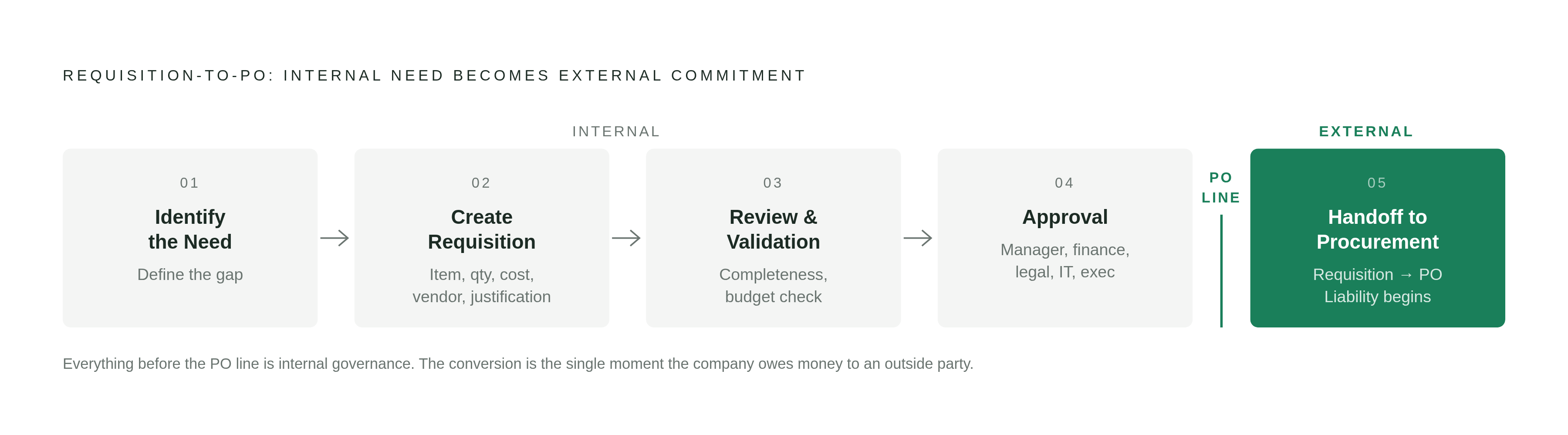
A working purchase requisition workflow moves through five stages, and the stages aren't independent checkpoints. Each one depends on the one before it holding up its end of the bargain.
It starts with identifying the need. Before anyone fills out a form, someone on a team recognizes a gap: they need a tool, a service, a batch of supplies. This stage is mostly legwork. Skipping this groundwork means the next stage inherits a guess dressed up as a requirement.
Stage two is creating the requisition itself. The requester fills out a standardized form, and "standardized" is doing real work in that sentence. The form captures item description, quantity, estimated cost, business justification, delivery requirements, and a suggested vendor. A consistent form means a consistent submission. The person reviewing it isn't playing detective to figure out what was actually requested.
Stage three is review and validation. A department head or finance controller checks the form for completeness, lines it up against the budget, and confirms the business justification actually justifies something. This is the stage that catches a weak Stage 2 form before it wastes an approver's time. If the form is missing a quote or a vendor name, the problem doesn't get fixed later. It gets kicked back here, or it should.
Stage four is approval. The requisition moves through whatever hierarchy the organization has set up, and depending on the value, department, vendor, or risk involved, that might mean a direct manager signs off, or it might mean finance, legal, IT, and an executive all need to weigh in before it moves forward. At every point in that chain, the approver has three options: accept it, reject it, or send it back for changes.
Stage five is the handoff to procurement, where an approved requisition becomes a purchase order. This is the moment the organization actually takes on external liability. Once a requisition reaches "Approved" status, it's eligible for conversion into a PO, and that conversion is the line between an internal conversation and an external commitment.
The audit trail runs alongside all five stages as a byproduct of doing the process correctly, not as a separate task bolted on. Every submission, every edit, every approval decision, every budget check, every PO generation gets time-stamped and documented as it happens. The record exists whether or not anyone goes looking for it later.
Approval routing logic and spend control
Stage four, approval, is where most of the actual control gets decided, and it runs on more than one design choice. Routing logic is a set of interlocking decisions about routing level, path type, and threshold triggers, and getting any one of them wrong undermines the whole system no matter how clean the intake form looked in Stage 2.
The first decision is routing level: document-level or line-level. Document-level routing treats the whole requisition as a single unit, which works fine when one cost center is paying for everything and one manager has the authority to approve it all. Line-level routing splits approval by item or group for a specific reason. Picture a maintenance team submitting a requisition with a mixed cart: a pump seal pulled from general inventory, and a specialized sensor charged to a capital budget. Those two line items need two different approvers, because they draw from two different funding sources. Document-level routing would force one approver to sign off on a line they have no authority over. Each line clears independently, and the header status reflects where the whole set of lines stands. If one line is still pending, the requisition stays "In review" at the header level, even if every other line cleared days ago.
The second decision is path type: sequential or parallel. Sequential routing passes the requisition from one approver to the next, one at a time. Parallel routing sends the requisition to multiple approvers at once, finance, legal, and IT reviewing simultaneously instead of in sequence, which cuts cycle time without cutting out any of the oversight. The choice between the two comes down to one question: are these approvers evaluating the same decision in sequence, or are they each judging a different dimension of the same request? There's no reason to make them wait in line for each other.
The third decision is threshold conditions, meaning what triggers a change in routing. A workflow can be configured to shift based on dollar value, department, vendor, budget category, or risk level. The chains need to be unambiguous. A requisition sitting in limbo because nobody's sure whose job it is to approve it at that dollar threshold is one of the most common stall points in the entire system.
Configuration also has to account for what happens on a bad day: an approver is out sick, a delegation rule needs to kick in, a request gets bounced back for corrections and needs to re-enter the queue. These edge cases are where a workflow that looks solid on paper quietly falls apart in practice.
Where manual workflows fail
Manual requisition workflows fail because the structure of manual processing, by design, makes failure the likely outcome, not because employees are careless. Blaming an employee for a bottleneck built into the system is like blaming a driver for traffic.
Start with fragmentation. In a manual environment, a request might live in an email inbox, a Slack message, or a conversation that happened in a hallway and was never written down anywhere. None of those channels talk to each other. Duplicate orders, missed deadlines, and employees who just wanted a tool to do their job get frustrated at a process that seems to exist to slow them down.
Then there's the data entry burden itself. For a department that submits a high volume of these requests, the hours lost to paperwork start to add up fast, and that time isn't spent doing the department's actual job.
From there, delay compounds. The request can still sit for days, or weeks, while a deadline the requester already told everyone about keeps getting closer.
A lot of what looks like a slow approval process is actually a broken intake process wearing a different costume. If a request lands on an approver's desk missing a quote, missing budget context, or missing vendor details, that approver can't make a decision. They send it back. It gets corrected. It gets resubmitted. It gets routed again. That round-trip is an intake problem disguised as an approval-speed problem, and fixing the approval chain won't touch it.
The broken intake disguised as approval delay threatens the whole system: when approval delays stretch into days or weeks, employees with a genuine, time-sensitive need stop waiting. They buy around the process, and procurement bottlenecks are a leading driver of exactly this kind of rogue purchasing. That's the specific outcome the entire workflow was built to prevent, created by the workflow's own friction.
All of this leaves a paper trail with holes in it, which raises exposure to non-compliance on internal purchasing rules, tax requirements, and category-specific oversight that regulators or auditors care about. Finance, meanwhile, spends its time untangling receipts, reconciling expense reports, and fixing coding errors instead of doing anything useful with the numbers.
What automation changes in the requisition workflow
Automated requisition systems fix the structural problems described above by centralizing intake, enforcing routing rules automatically, and building a real-time record as a side effect of normal use. Automation still depends on someone designing the workflow correctly.
In routing, rules-based logic replaces manual handoffs, so a requisition lands on the right approver's desk without someone having to manually forward an email and hope they remembered the right person. Budget checks run automatically against department allocations the moment a request is submitted. Vendors that fall outside policy, or requests that don't meet compliance rules, get flagged before they move any further down the chain.
In visibility, a digital workflow captures spend data the moment a requisition is created, weeks before an invoice arrives. That gives finance real-time accruals and turns the team from a group reconciling what already happened into a group that can act on what's about to happen.
An AI layer is now showing up on top of this structure in the market. When a procurement professional creates a requisition, that layer can analyze spend history, supplier performance, and market pricing to suggest an optimal supplier choice on the spot. That shifts requisitioning from a clerical task, filling in boxes, into something closer to a decision-support conversation.
One point deserves more attention than it usually gets: user experience functions as a control mechanism, not just a convenience. If the system is harder to use than pulling out a credit card, employees will reach for the credit card, and every bypass is a requisition that never got reviewed. Curated catalogs of pre-approved products reinforce this by letting employees find vetted items without ever visiting an outside vendor's site, which makes compliance the default path instead of an extra chore. Mobile access matters for the same reason: an approver stuck in a meeting can still approve from a phone, which removes the "waiting for someone to get back to their desk" delay that stalls so many manual chains.
None of this is a complete fix, though. Proving actual return on investment for AI agents in procurement remains genuinely hard to do. Beyond the technology itself, there's an organizational readiness gap: teams used to manual processes sometimes resist automation because it feels like losing control, and every department tends to have its own approval flows and compliance quirks, which makes standardizing anything a real challenge that no software purchase solves on its own.
Approval workflow design in practice across different departments and purchase types
Purchase context varies enough by department and purchase type that no single approval path can cover every case. Good workflow design means mapping different conditions to different paths, not forcing every purchase through the same sequence of approvals regardless of what's actually being bought.
Mid-range spend, or purchases touching budget categories that need finance's attention, usually call for multi-level sequential approval: manager, then department head, then finance, each one reviewing in turn. It's slower by design, but the oversight is thorough.
Parallel approval fits a different situation. Finance, legal, and IT all reviewing at the same time works well when each is judging a different dimension of the same request rather than rubber-stamping the same question one after another. That cuts the cycle time without cutting any corner that actually matters.
Specific departments bring their own wrinkles. IT purchases often need a security review on top of standard budget approval, so someone assesses the technical requirements and vendor risk before any commitment gets made. Legal or contract-related purchases need legal eyes on the contract terms and regulatory exposure before they move forward. High-value or unbudgeted purchases, a brand-new vendor relationship or a large contract nobody planned for, typically route all the way to executive sign-off, beyond whatever finance alone would normally require.
The maintenance scenario from earlier is the cleanest real-world case for line-level routing. A pump seal from general inventory and a capital-budget sensor sitting on the same requisition need two different approvers reviewing two different lines, each clearing independently rather than waiting on the other.
What ties all of these cases together is one simple principle: every approver in the chain should have a specific, identifiable reason for being there. A routing path that cc's people out of habit, rather than necessity, doesn't add oversight. It adds delay, and delay is exactly the pressure that pushes employees toward the rogue purchasing the whole workflow was built to prevent.
Methodology & sources
- What Is a Purchase Requisition Workflow? Steps, Challenges & Best Practices
Informed the description of review and validation as a stage that catches incomplete forms before they waste approver time, and the discussion of routing logic in Stage 2.
- Stop Downtime: Purchase Requisition Workflow for Purchasing & Finance
Provided detail on the handoff from approved requisition to purchase order, and the audit trail generated at each stage of the workflow.
- What Is a Purchase Requisition? How It Controls Spend Before You Buy
Informed the explanation of the distinction between a purchase requisition as an internal request and a purchase order as an external commitment to a vendor.
- Purchase Approval Workflow Examples for Mid-Market Teams
Provided examples of parallel versus sequential approval routing and department-specific approval path variations.
- Purchase requisition workflow - Supply Chain Management
Informed the description of document-level versus line-level routing, header status reflecting pending lines, and how approved requisitions convert to purchase orders.