Mobile Expense Capture and Receipt Management
Capturing receipts at the point of sale prevents costly errors downstream.

- Written by
- Hana Aslan
- Updated
- September 28, 2026
- Reading time
- 8 min read
- Sources cited
- 2 sources ↓
What this covers
Paper receipts remain the dominant record of in-store purchases, yet much of that spending data never makes it into a structured system. That's the real starting point for any conversation about mobile expense capture: the moment of purchase is where the paper trail either survives or dies. Everything downstream, categorization, approval, reimbursement, depends on what gets caught in that first thirty seconds at the register.
Think of the expense lifecycle as a relay race with four handoffs: capture, categorization, approval, reimbursement. Drop the baton at any one of them and the whole team loses time. A misread receipt at capture doesn't just sit there quietly; it turns into a wrong category, then a flagged approval, then a reimbursement that shows up three weeks late. Manual work fails every single time a human touches it, which is the part most finance teams still won't admit out loud.
What Mobile Capture Does at Purchase
The job is plain: take a photo of a receipt, pull structured data out of it, and attach that data to a transaction record before the employee walks away from the counter. OCR (optical character recognition) does the reading, pulling merchant name, date, and total off an image and dropping them into fields a computer can use.
Here's a distinction worth knowing before trusting any vendor's pitch: character-level accuracy versus field-level accuracy. Vendors love character-level numbers because they look bigger on a slide, but nobody cares if an app read nearly all of the letters on a receipt correctly if it still can't tell a large total from a small one. Field-level accuracy asks the only question that matters: did the app get the merchant name, date, and total right, as usable data someone can act on?
Good apps clear 95% or better on field-level accuracy, and the best engines process receipts in a matter of seconds. Veryfi has published a benchmark of 98.7% field-level accuracy on invoices with an average response time of 2.8 seconds, and 99.56% line-item accuracy on receipts processed in under 5 seconds. Numbers like that separate a real capture engine from a basic photo-storage tool.
Offline sync matters more than people give it credit for, especially for anyone traveling. Capture has to work with zero signal, then upload once the phone finds a network again. Ask a vendor directly: do they publish field-level accuracy, or just character-level? And what happens to a receipt that's crumpled, faded, or printed on thermal paper already going white at the edges? Processing pipelines continue to evolve in ways that can both speed up results and reduce unnecessary data exposure.
How Categorization Enforces Policy Before Submission
Once OCR pulls the fields, machine learning takes over: assigning expense categories, matching to cost centers, flagging anything that smells like a policy violation. The good tools do this before the employee hits submit, rather than leaving it for an overworked approver to catch three days later.
Push alerts do a lot of quiet work here. A per-diem ceiling gets crossed, a category doesn't match the receipt, a business-purpose note is missing, and the app surfaces that immediately while the trip is still fresh in someone's memory, instead of during an email chain a month later.
Card-linked capture goes a step further and eliminates the categorization step almost entirely. Enriched transaction data streams straight from a corporate card into the expense record, already coded with merchant category codes and timestamps. No guessing, no dropdown menus, no employee trying to remember whether the client dinner was "meals" or "entertainment."
A categorization engine worth paying for learns from corrections over time, both at the individual level and across the whole organization, and it catches policy violations before submission instead of after. It handles split expenses too, like when someone grabs a client dinner and a personal drink on the same tab. Most tools still leave a gap, though: mileage and per-diem entries have no receipt attached at all, so they need GPS-based tracking and built-in per-diem calculators inside the same workflow, not added as a separate feature nobody tests.
Clean Data Makes Approval Faster
When a submission arrives pre-coded and already flagged for policy issues, the approver's job changes shape. They become an exception reviewer, someone who only has to look at what's actually unusual.
That shift matters because manual processing is slow. Spendesk research puts the average time to process a single expense report at 50 minutes, spread across the employee, the manager, the accountant, and finance. The full cycle runs 30 days, which is a long wait to get someone's own money back for a client lunch they already paid for.
Mobile approval fixes two specific things. Approvers can act from their phones in a couple of minutes instead of stacking reports into a weekly batch review, and the audit trail comes timestamped and attached directly to the original receipt image, so nobody is digging through email threads six months later trying to remember why a hotel charge got approved. A solid approval layer routes based on amount thresholds or cost center, hands off to a delegate when a manager is traveling, and escalates automatically if a report sits too long. Approval also triggers the payment run, so the closer it sits to the original purchase, the less time an employee spends floating the company's money out of pocket.
Manual Steps Cost More Than You Think
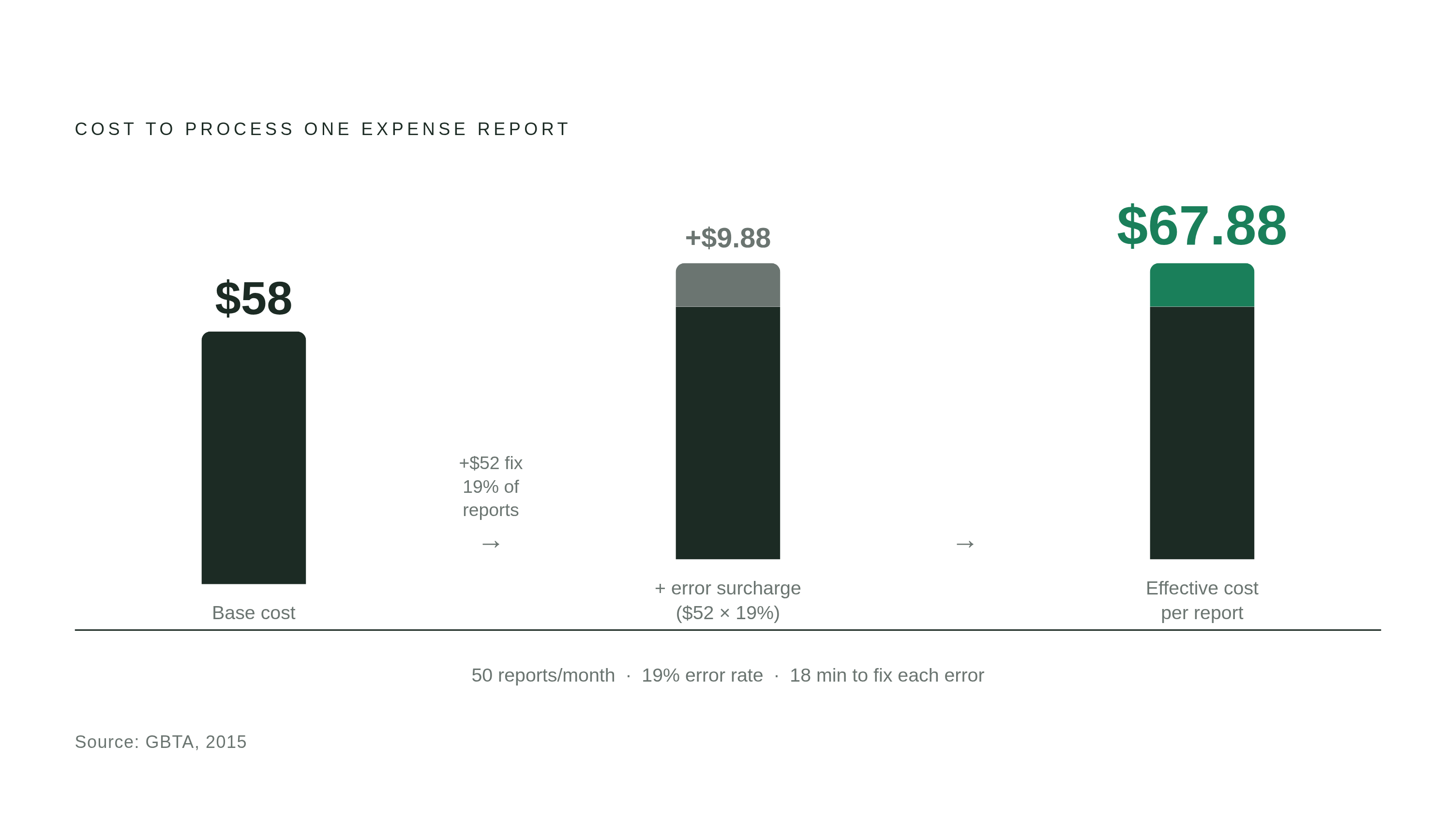

GBTA data puts the cost of manually processing one expense report at $58. Nineteen percent of reports contain an error, and fixing that error costs another $52 and 18 minutes of somebody's day, which pushes the effective cost per report to around $67.88 once the error rate is weighted in.
Run the math for a small team processing 50 reports a month: that's tens of thousands of dollars a year spent re-keying numbers a phone camera could have caught the first time. Worth flagging: the GBTA's $58 baseline dates back to 2015. Wages have gone up since then, so the real number today almost certainly runs higher.
Partial automation is where most companies get stuck. Some capture the receipt fine but still manually re-enter the data into a separate system. Others automate capture and then leave approval and reimbursement sitting in email and spreadsheets. Plenty connect mobile capture all the way to the ERP system, only to keep a manual reconciliation step at month-end that undoes half the time saved.
AI Fakes Demand Better Receipt Verification
Reports from expense audit platforms indicate that AI-generated receipts have shifted from a rare edge case to a dominant share of flagged fakes in a very short window. The submissions behind those flags span employees across many companies, claiming reimbursements for expenses that never happened. Recent surveys suggest a notable share of employees admit to using AI to generate a fake expense receipt at some point. The tactics vary: some fabricated purchases entirely, some inflated the value of something real, and others used AI to recreate a receipt they had lost.
Visual inspection of receipts is no longer a reliable control. With the right prompt, AI can replicate thermal paper texture, add creases that look like they came from a real pocket, and simulate the blur of a rushed phone photo. Surveys of finance professionals suggest many cannot reliably tell an AI-generated fake from the real thing.
So the whole approach to verification has to change, and here's the part most teams still get wrong: they keep inspecting the document instead of the transaction. Checks need to match the receipt against an independent record, card data, merchant category codes, payment timestamps, something that confirms a purchase happened regardless of how convincing the paper or pixels look. Card-linked capture makes that matching automatic. Receipt-only workflows have no equivalent check, which means they remain vulnerable even as the quality of fakes continues to improve.
Expense reimbursement fraud is a well-documented problem that often runs undetected for well over a year before anyone catches it. AI has made it significantly easier to execute.
The Market Is Moving Toward Mobile-First

Verified Market Reports valued the receipt and expense management software segment at $5.45 billion in 2025, projecting growth to $12.67 billion by 2034, a 9.87% compound annual growth rate. Cloud already holds 74.18% of the expense management software market as of 2025, and Mordor Intelligence expects mobile-first tools to grow fastest, at a 14.8% compound annual rate through 2031. On-premise, desktop-first systems are losing ground, while mobile-native, cloud-synced platforms are where engineering investment is concentrated.
The AI layer is climbing fast too, moving from helping someone scan a receipt to auditing every single submission. Instead of sampling a handful of reports for a quarterly audit, AI reviews everything continuously, turning audit from a periodic check into a constant background process. Major enterprise software players are investing in machine-learning-driven expense management and treating it as core infrastructure, not a secondary feature.
Anyone buying today should treat OCR as table stakes, not the deciding factor. A platform chosen purely for good OCR needs a credible plan for transaction matching, AI-driven audit, and card-linked data too, or it's solving the easiest fraction of the problem. The whole lifecycle is folding into one system now, rather than staying split across multiple disconnected tools.
How to Evaluate Tools Across the Full Lifecycle
Judge each stage of the lifecycle on its own, then ask whether the stages actually talk to each other without a human standing in the middle passing data between them. That second question is the one most demos are built to avoid.
For capture, look for field-level accuracy (ask how it's measured, not just what number gets quoted), offline capture with sync that works once the signal comes back, and support for paper, email, PDF, and card transaction streams all at once.
For categorization and policy, the tool should flag issues before submission, not after approval. Mileage and per-diem need to sit inside the core workflow, not added as a secondary feature, and the system should learn from how the whole organization corrects it over time.
For approval, mobile-native access with delegated routing is table stakes, and so is a full audit trail attached to the receipt image itself, plus integration with ERP or accounting software that doesn't require someone exporting and importing spreadsheets by hand.
Fraud and verification is the piece most buyers skip. Card-linked transaction matching needs to be a core feature, not an add-on tucked behind a pricing tier. AI-audit coverage should apply to every submission, not a random sample. Ask a vendor directly how their platform handles AI-generated receipt patterns. If they don't have a clear answer, that is a meaningful signal.
Platforms worth running through this checklist include Concur, Expensify, Ramp, Brex, Zoho Expense, and Emburse. Each one leans stronger in different parts of the lifecycle and fits different company sizes; none wins on every dimension, which is exactly why evaluating the full lifecycle matters more than picking whichever name shows up first in a search. The real question before signing anything: when a receipt gets submitted, does it automatically connect to a verified transaction, or is someone still matching the two by hand?
Methodology & sources
- https://www.mordorintelligence.com/industry-reports/expense-management-software-market
Provided the cloud market share figure of 74.18% and the 14.8% CAGR projection for mobile-first tools through 2031.
- https://www.verifiedmarketreports.com/product/receipt-and-expense-management-software-market/
Provided the market valuation of $5.45 billion in 2025, the $12.67 billion projection for 2034, and the 9.87% CAGR figure.