Integrating Expense Management with ERP Systems
Clean data flowing into your ERP stops fraud before it starts.
- Written by
- Grant Farrell
- Updated
- September 12, 2026
- Reading time
- 10 min read
- Sources cited
- 2 sources ↓
What this covers
Integrating expense management with an ERP happens in three stages: map your data, pick the right middleware, then test everything before it touches real money. Skip or rush any one of those stages and you'll be staring at duplicate records and reconciliation gaps six weeks after go-live, wondering what you did wrong. I've watched it happen enough times to set my watch by it.
Here's the pattern. A finance team bolts a new expense tool onto an existing ERP without mapping the fields first, and the old manual workarounds don't disappear, they multiply. Someone's still typing cost centers by hand because nobody finished the mapping, and now they're doing it in two systems instead of one. Add a submission workflow with more than three steps, and compliance drops fast, leaving finance stuck chasing missing receipts and doing accrual math by hand at month-end.
None of this is cheap. Fixing a single bad expense report eats up around 15 minutes of somebody's day, and multiply that by a few hundred reports a month and you've basically created a part-time job whose only purpose is cleaning up a mess the integration was supposed to prevent. Knowing what happens at each stage, in order, is what separates a clean rollout from one that just moves the busywork somewhere else.

What the integration actually needs to accomplish
Before anyone touches a connector, figure out what "done" actually looks like. A working integration does four things, and they deserve to be named separately instead of getting mashed into some vague "efficiency" bucket.
It kills duplicate data entry between the expense tool and the accounting or ERP modules. It gives real-time spend visibility across departments (approvals, payments, reimbursements) without anyone reconciling spreadsheets by hand. It syncs expense data automatically with procurement, payroll, and budgeting, instead of leaving it stranded in its own silo. And it builds audit trails as transactions happen, not weeks later when an auditor comes asking.
That last one matters more than it used to, and the numbers back it up. The 2025 Finance Leaders' AP Fraud Report found 77% of finance leaders knew a victim of accounts payable fraud in the past five years, up from 65% in 2024. Only 35% called their fraud prevention "very effective," down from 56% the year before. That's not a rounding error, and it points to a full-blown confidence collapse in about twelve months.
The integration is what closes that gap. Machine-learning fraud flags, duplicate receipt detection, out-of-policy alerts, none of it means anything if the expense data feeding the ERP is dirty. Feed a fraud model garbage, and it gets very good at spotting garbage patterns. Getting clean data flowing in the first place is what the rest of this is about.

Stage one: mapping your data before touching a connector
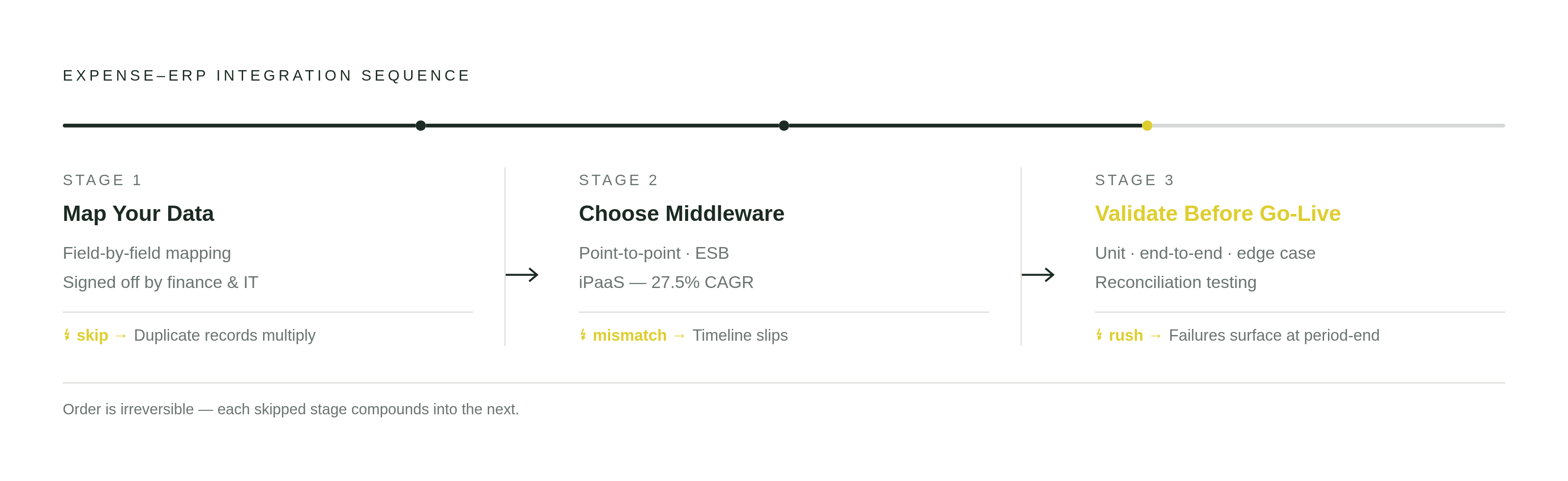
Data mapping means figuring out every field that has to travel between the expense tool and the ERP, then agreeing on how it's labeled, typed, and checked on both ends. Sounds tedious because it is, and it's also the step almost everyone skips.
A handful of fields cause most of the pain. Cost center and department codes are often structured completely differently between an expense platform and an ERP's chart of accounts. Currency and exchange-rate fields turn messy fast the second you're running multiple entities or countries. Employee IDs are a classic mismatch: the expense system might use an HR identifier, the ERP a finance identifier, and payroll integration needs both talking to each other. Receipt attachments bring their own headache too, since file format, storage location, and the link back to the transaction all have to survive the trip in one piece.
You can't push this off until after picking middleware. Whatever connector or iPaaS tool you land on has to actually handle the transformation logic this mapping work turns up. Find a field mismatch after you've already deployed, and you're rolling back or patching by hand, which just reintroduces the exact mess you were trying to fix.
The real deliverable here is a field-by-field mapping document, signed off by finance and IT both. Written beats a Slack thread or a handshake in the hallway, every time. Get finance operations in the room since they know what the ERP expects, bring the expense platform administrator since they know what the tool exports, and pull in payroll or HR if reimbursements touch a payroll cycle.
Stage two: choosing the right middleware for your environment
Three setups dominate here, and each fits a different situation.
Point-to-point connections are custom scripts wiring two systems together directly. Quick to build for a single link, sure, but add another app and you're bolting on another custom connection, and one system upgrade can quietly snap several of these at once. Fine for something narrow and stable, but a liability for anything bigger than that.
An Enterprise Service Bus (ESB) is self-hosted middleware built around a central bus. Strong for complex, high-control environments, especially legacy on-prem systems, but it needs dedicated infrastructure and people who actually know how to run it. This is the pick for a large enterprise already committed to an on-prem ERP, not a company trying to move fast with three people in IT.
Then there's iPaaS: cloud-hosted, vendor-managed, pre-built connectors, low-code workflow builders you can drag and drop. Way less overhead, and it's growing faster than the other two combined. Allied Market Research puts the global iPaaS market at $37.9 billion by 2031, growing at a 27.5% compound annual rate. That's not a niche tool anymore, that's where the market's headed.
For most expense-to-ERP setups, a hybrid works best: APIs for real-time checks the second someone submits an expense, iPaaS for bulk syncs, scheduled jobs, and event-driven stuff like a payroll trigger. Which way you lean depends on whether your ERP lives in the cloud or on-prem, how much integration know-how your IT team actually has sitting around (iPaaS lowers that bar, it doesn't erase it), and how often the data actually needs to move. A real-time card feed and a monthly payroll batch are not the same problem, and treating them like they are is how timelines slip.
Speaking of timelines: a narrow, two-system integration can wrap in a few weeks, while a full program tying together expense, ERP, HR, payroll, and travel booking realistically eats several months, sometimes a year. And when the estimate blows past reality, nine times out of ten it traces back to sloppy mapping from stage one.
The data flows that must be configured explicitly
A mature integration runs on four data flows, and none of them should sit on default settings.
Corporate and prepaid card feeds need to land in the expense platform on their own and reconcile against submitted reports without a human matching line items by hand. Travel booking data, flights, hotels, rental cars, should populate expense reports the moment someone books, not get chased down at reimbursement time. HR and payroll systems need approved reimbursements to trigger payroll entries on the right cycle, which only works if the employee ID and cost center match exactly across all three systems. And the ERP accounting modules need approved reports to post journal entries to the right GL accounts, cost centers, and periods, because this flow is directly tied to how fast the books close.
Approval workflows deserve a mention on their own, since they act as a flow, not just a checkbox somewhere in settings. Routing rules need to live in the integration layer itself, not buried inside the expense tool, so a policy exception actually gets surfaced to the ERP cost center owner instead of dumping into a generic finance queue. And remember that three-step threshold: submission processes with more steps than that see compliance fall off a cliff. The integration should cut handoffs, not just recreate whatever paper process it replaced with extra clicks.
Companies that fully automate expense reporting see real drops in manual errors, and the gains trace straight back to these four flows being fully wired, not half-configured and left to chance.
Stage three: validating the integration before it touches live financial data
Teams skip validation, or rush through it, because one successful test transaction feels like proof the thing works. It isn't, since real failures show up at volume, at period-end, or the second an edge case (foreign currency, a split cost center, a voided expense) hits the mapping in a way nobody thought to check.
A real validation sequence has four parts. Unit testing checks each field mapping with fake records, making sure a department code entered in the expense tool actually lands in the right ERP account instead of some default catch-all. End-to-end testing runs a full expense lifecycle (submission, approval, rejection, resubmission, final posting) through a sandbox. Edge case testing covers foreign currency, split allocations across multiple cost centers, duplicate receipt submissions (a known fraud vector), and out-of-policy claims that should get held, not posted automatically. And reconciliation testing compares the ERP ledger against the expense system's approved totals at the end of a simulated period. Any gap there is a mapping error, never just rounding, no matter how much you want it to be.
Finance operations has to sign off on the reconciled output, not just IT. A sync that runs flawlessly and posts to the wrong GL account is still a failed integration, whatever the system logs say about it.
Testing misses things validation catches, and it's usually the boring stuff: how the system handles concurrent submissions during month-end crunch, what happens when the ERP responds slowly and times out, whether the error log actually names which record failed and why instead of just flagging that something, somewhere, broke.
How leading expense platforms handle ERP connectivity in practice
AI receipt capture, automated policy checks, native connectors to SAP, Oracle, Microsoft Dynamics: none of that's a differentiator anymore. It's table stakes, as vendor positioning across the market now reflects. What actually separates platforms is how deep those connections go once you're past the sales demo.
SAP Concur runs deep native integration with SAP ERP and fits enterprises already living in that world, pulling travel, invoice, and expense data into one pool. Its strength is breadth on the ERP side, though cost and complexity climb right alongside company size.
Oracle Expense, part of Oracle Fusion Cloud, ties tightly into Oracle Financials and Procurement, running real-time budget checks against ERP commitments the moment someone submits. Natural fit if you're already on Oracle, but an awkward fit if you're not.
Microsoft Dynamics 365 Expense integrates natively with Dynamics 365 Finance, and its project-accounting features make it a strong pick for professional services firms already living on the Microsoft stack.
Payhawk goes card-first, feeding corporate card transactions straight into the expense workflow and ERP sync, betting on real-time visibility over chasing reimbursements after the fact. Fyle leans into API connectivity with QuickBooks, Xero, NetSuite, and Sage, aiming at mid-market companies who want real ERP integration without an enterprise price tag attached. ExpenseVisor builds its entire pitch around ERP integration, leading with financial control and flexible GL mapping as the whole selling point.
Whichever way you're leaning, check the same handful of things: how deep the native connector actually goes versus leaning on a third-party iPaaS layer, how granular the GL mapping gets, how visible the error logs and sync history actually are, and whether the approval workflow bends to match your ERP's cost center structure or forces you to bend instead.
The operational checks that keep the integration accurate over time
Here's a failure mode that catches people off guard every time: someone updates the chart of accounts in the ERP and forgets to loop in the expense platform administrator. Within days, approved expenses start posting to accounts that don't exist anymore, or worse, to some default bucket that quietly swallows real spend data whole.
Three habits keep that from happening. Change-control communication means any ERP change, a new cost center, a renamed account, a full chart-of-accounts overhaul, triggers a mandatory review of the integration mapping before it goes live, not after the damage is done. A monthly reconciliation, at minimum, checks the expense system's approved totals against what actually posted in the ERP; this isn't about catching fraud (that's the ML layer's job), it's about catching mapping drift before it compounds across a quarter or two. And error logs need someone's eyes on them within a set window, because a failed sync left sitting until period-end stops being a technical problem and turns into an accrual estimate problem instead.
Companies that keep these habits up report better regulatory compliance after integration, and that sticks around because of the ongoing maintenance, not because of whatever went right on go-live day.
So who owns all this, IT or finance? Both, and there's no getting around it. IT owns the sync infrastructure, finance owns the reconciliation output, and either one running solo misses half the ways this stuff breaks.
A mature integration shows its work at period-end. The expense data's already sitting in the ERP ledger: approved, categorized, reconciled, and financial close turns into a confirmation step instead of a scavenger hunt.
Methodology & sources
- https://expensevisor.com/erp-integration-for-expense-management-with-expensevisor-streamlining-financial-control/
Provided the basis for describing ExpenseVisor's focus on ERP integration and flexible GL mapping as its core selling point.
- https://www.ibm.com/think/topics/ipaas
Supported the description of iPaaS as offering low-code workflow builders for cloud-hosted integration.