AP Automation Software Comparison
Evaluate platforms by cost per invoice, error rates, and whether approvals actually move.

- Written by
- Leila Vidal
- Updated
- September 25, 2026
- Reading time
- 12 min read
- Sources cited
- 1 sources ↓
What this covers
- What manual AP actually costs (the baseline every comparison should be measured against)
- The core capability set that separates a real AP automation platform from a payments tool
- How organization size and invoice volume should narrow the shortlist before any demos
- BILL: the SMB default and where it runs out of road
Let's start with what this decision actually is. Choosing AP automation software is not a feature shopping exercise. It is a bet on whether a platform can specifically close the gaps that are bleeding your team's time and money right now. Make the wrong call and you are looking at a months-long implementation, a tool that does not talk to your ERP, and a finance team that still has to manually key invoices into a spreadsheet. Make the right call and the work basically does itself. This article is built to help you make the right call.
What manual AP actually costs (the baseline every comparison should be measured against)
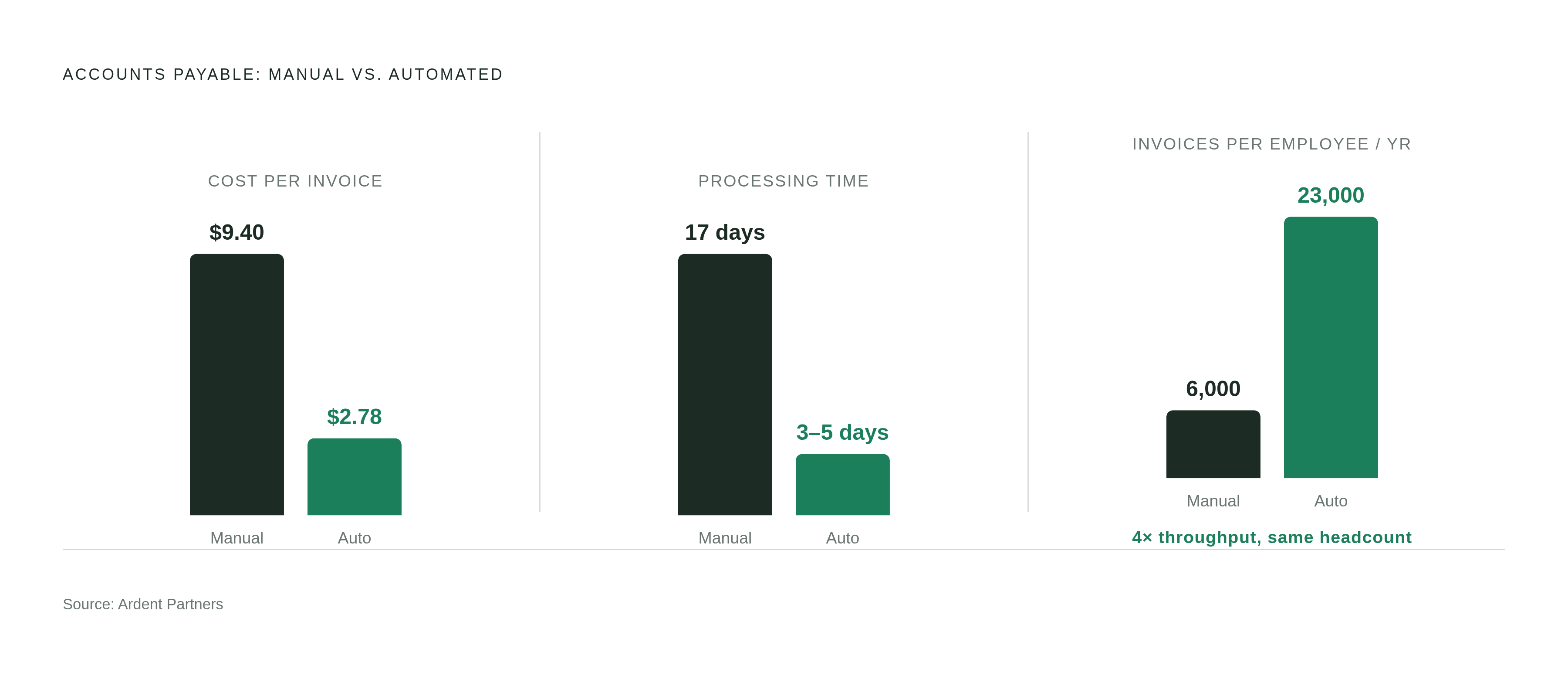
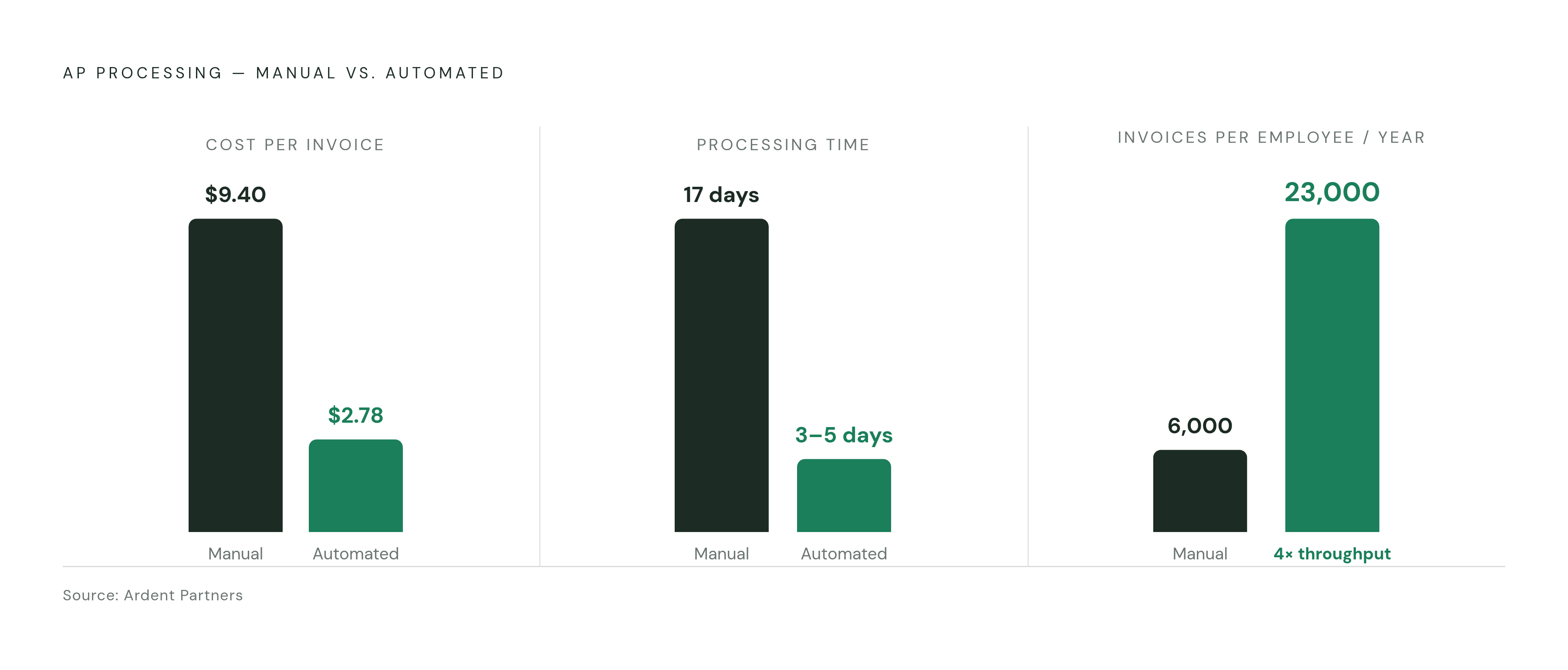
Here is the number that should be on the wall of every AP department: processing a single invoice manually costs around $9.40. Best-in-class automated teams do it for around $2.78. That is a 70% gap, per Ardent Partners.
It is not just money. It is time. Manual invoice processing takes roughly 17 days and nearly $13 per invoice. Leading automation platforms bring that down to three to five days and two to three dollars. And when you zoom out to throughput, a fully manual AP setup supports around 6,000 invoices per AP employee per year. A fully automated one? Over 23,000. Same headcount, four times the output.
The error picture makes it worse:
- About 39% of invoices contain errors
- 57% of teams say too much manual data entry is their primary pain
- 53% identify data errors and discrepancies as a significant challenge
- 33% say approvers simply take too long to respond
- 29% of enterprises require six or more approvals per invoice
- 66% of respondents are still manually keying invoices into their ERP (actually more than the year before, which is a problem getting worse, not better)
- 63% of AP teams spend 10 or more hours weekly on invoice processing, up from 52% the prior year
Those last two stats are worth sitting with. More teams are manually keying invoices than before. More teams are spending more hours on it than before. The automation gap is not closing on its own.
Every platform in this article should be evaluated through one lens: does it specifically fix data entry volume, error rates, and approval lag? If it does not address at least two of those three, it is probably the wrong tool for you.
The core capability set that separates a real AP automation platform from a payments tool
A real AP automation platform does six things in sequence. It captures the invoice. It validates the fields. It routes approvals. It matches against POs and receipts. It schedules the payment. Then it posts everything back to the ERP. If a tool skips or weakens any of those steps, you are not automating AP. You are automating part of AP and still babysitting the rest.
Invoice capture is where most vendors lead their pitch. OCR and AI-based extraction are table stakes at this point. The real question is what happens when an invoice is weird. A non-standard format, a PDF that is actually a scanned image, a supplier that still faxes. How a platform handles those edge cases is what separates a good tool from a polished demo.
Approval routing should give you configurable rules, mobile access, and a full audit trail. Not just an email that says "please approve this." If your approvers are the bottleneck (and one in three teams says they are), the routing logic matters enormously.
PO matching comes in tiers:
- Two-way matching (PO vs. invoice) is the minimum if you have a formal purchase order process
- Three-way matching adds the goods receipt confirmation, which is the control that catches overbilling and duplicate payments before they happen
- If you do not have a formal PO process at all, you need exception-handling queues instead of matching logic
ERP integration is where buyers get surprised, and usually not in a good way. More on this in the last section.
Payment execution is not a uniform feature. ACH, check, virtual card, and international wire are four different capabilities. Which methods a platform actually supports determines whether it replaces your current payment workflow or just sits next to it.
Scalability is a useful proxy for platform maturity. Teams processing high invoice volumes with automation often maintain the same headcount as teams processing a fraction of that volume manually. If a vendor cannot point to customers who have scaled significantly without adding AP headcount, that is worth noting.
How organization size and invoice volume should narrow the shortlist before any demos
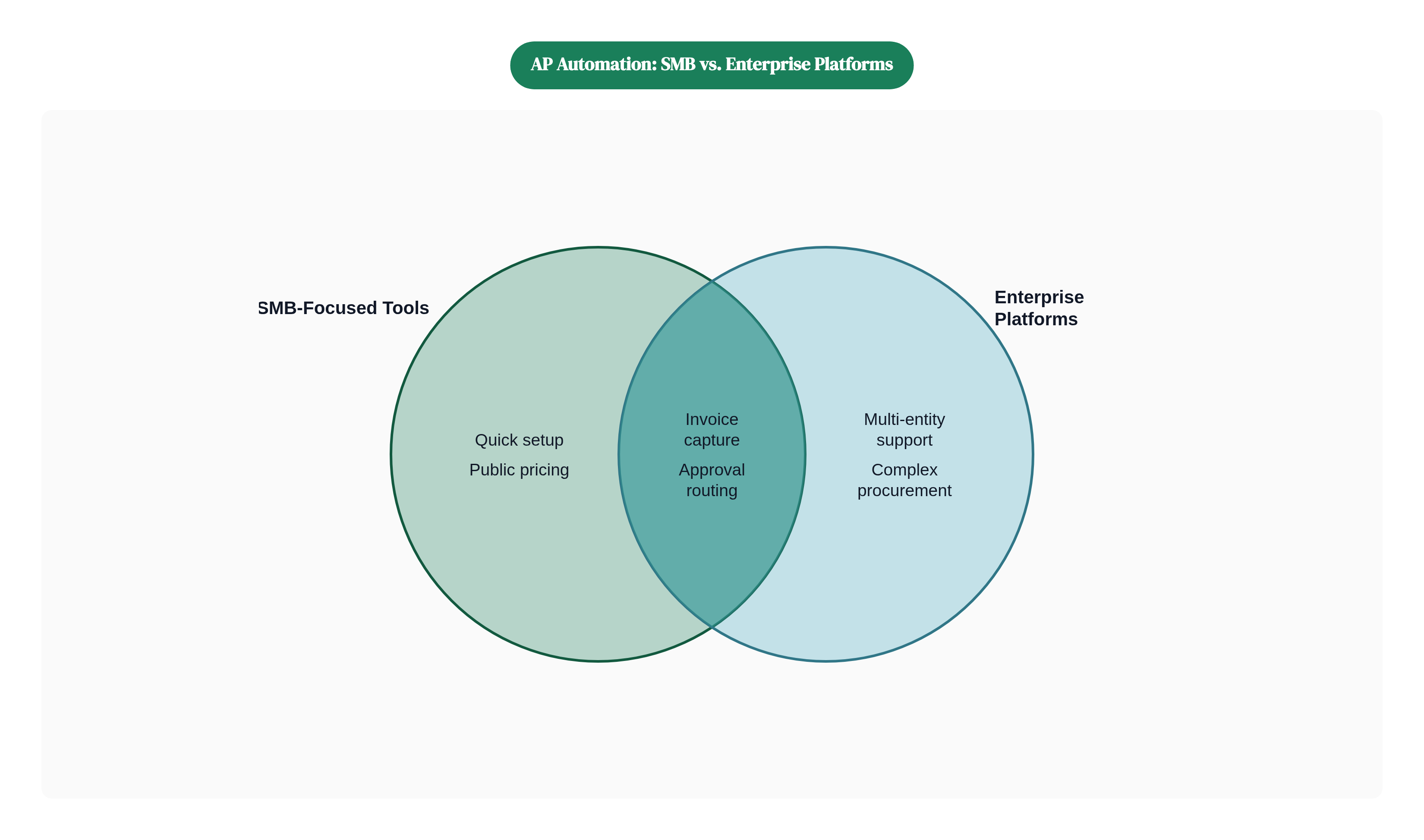
Large enterprises represent the majority of AP automation revenue today, driven by high volumes, complex approval chains, and multi-entity structures. These buyers need multi-entity support, configurable workflows, and deep ERP integration above everything else. The SME segment is the fastest-growing, reflecting how SaaS platforms have lowered the barrier to entry. SMB buyers typically care about ease of setup, predictable pricing, and ERP connectors that work out of the box.
Before you book a single demo, answer these questions:
- Monthly invoice volume. Sub-500, 500 to 5,000, or high volume and up. This alone eliminates a chunk of the market.
- Number of legal entities. One entity with clean reporting is a different problem than five entities that need consolidated financials.
- International payment needs. Domestic-only is straightforward. Multi-currency and multi-country is a different tier of capability.
- ERP(s) in use. This is often the fastest filter on the whole list.
- Whether a formal PO process exists. Determines whether matching matters at all.
- Current approval structure. Linear single-sign-off is simple. Parallel or conditional routing is not.
One more thing worth flagging: deployment preference still matters. On-premise held a majority of market share in 2025, and for regulated industries or organizations with data residency requirements, that is a non-negotiable constraint, not a preference.
Get these answers before you open a vendor comparison page. The profiles below will make a lot more sense with them in hand.
BILL: the SMB default and where it runs out of road
BILL is the platform most small businesses encounter first, and for good reason. It is cloud-based, launched in 2006, and built specifically for small to mid-sized businesses that need invoice capture, approval workflows, and payment scheduling without a massive implementation project.
The core capabilities are solid for the segment: invoice capture, configurable approvals, ACH, checks, and virtual cards. Pricing is publicly listed, which is refreshing in a market full of "contact us for a quote." Tiers run from a modest per-user monthly rate at Essentials up to a higher rate at Corporate, with Enterprise going custom.
That per-user pricing is worth examining, though. Approvers are not free on BILL. If you have a large or distributed approval chain, costs add up faster than the base rate suggests. Compare that to platforms where approvers are free by design.
BILL launched a procurement module in early 2025, but it remains an AP-first product. True procure-to-pay functionality is still limited. ERP integration works best with QuickBooks Online. Organizations on more complex ERPs should verify compatibility before putting BILL on the shortlist.
Best fit: Small businesses and growing SMBs that need reliable, functional AP automation without a long runway to go live.
Where it runs out of road: Multi-entity consolidation, international payments, and teams that have outgrown per-user pricing at scale.
Tipalti: when global payments and multi-entity complexity are the primary drivers
If you are paying suppliers in dozens of countries across multiple currencies, and you are trying to stay compliant with international tax requirements while doing it, Tipalti is built for that problem.
The differentiating capability is the global payment infrastructure. VAT ID collection and validation is included in the base tier. The platform handles multi-entity structures and cross-border payments in a way that most AP tools simply do not. This is why it often appears on shortlists specifically when international complexity is the primary driver.
Platform fees start at a low monthly base, and pricing scales with multi-entity support and international currency requirements. That is reasonable for what it covers.
Two caveats worth knowing upfront. First, implementation typically runs two to three months. That is longer than most SMB tools, and it matters if you have a hard go-live deadline. Second, Tipalti's invoice capture has earned mixed reviews for handling non-standard formats. If your suppliers send invoices in a wide variety of layouts and formats, that is a real trade-off to evaluate.
Reporting and customization are also cited as limited in independent assessments, which is worth noting if your finance team expects to build custom dashboards or exports.
Best fit: Mid-market and growth-stage companies managing international supplier networks, high cross-border payment volume, or complex tax compliance scenarios.
Not the right call: Teams whose primary pain is domestic invoice processing efficiency and who need to go live fast.
Stampli: AP-centric collaboration for teams where approver engagement is the bottleneck
Stampli was founded on a very specific observation: invoice disputes and delays do not happen because the technology failed. They happen because the context is scattered. The approval question is in an email. The supporting documentation is in a shared drive. The conversation about the discrepancy is in Slack. Nobody has the full picture in one place.
Stampli puts all of it on the invoice itself. Conversations, documentation, approvals, and coding history all live in one place. The AI assistant (named Billy the Bot, which is a very confident product naming decision) learns your coding patterns and approval behaviors over time, getting better the more you use it.
The platform processes a significant volume of transactions annually, which signals that this is not a boutique tool. It can handle mid-market scale.
Pricing is usage-based and quote-driven. The important detail here is that approvers are free, which keeps costs predictable when you have a large number of occasional approvers. That is a direct contrast to BILL's per-user model and worth running the math on before you compare sticker prices.
ERP integration is a deliberate design priority. Stampli connects to a broad range of ERPs without requiring the ERP itself to be reconfigured. This is rarer than it sounds.
Hard boundary: Stampli is AP-only. No AR automation, no cash forecasting, no treasury management. Teams that need full cash lifecycle visibility will need to pair it with something else.
Best fit: Mid-market finance teams where approval delays and communication overhead are the primary bottleneck, and where ERP integration flexibility matters.
Coupa: enterprise spend management with AP as one component of a larger platform
Coupa is not an AP tool. It is a spend management platform where AP is one module. Understanding that distinction is the first step to knowing whether it belongs on your list.
The scope is intentional and significant. Coupa connects AP to procurement, sourcing, contract management, and spend analytics. Large enterprises select it specifically because they want unified visibility and control across all of that, not just faster invoice processing. If that is the mandate, Coupa makes sense.
If that is not the mandate, the tradeoffs get steep quickly. Pricing typically starts around $2,500 per month, which removes it from consideration for most SMB and many mid-market teams before feature comparison even begins. On G2, it earns a solid rating, but user concerns cluster around limited reporting flexibility, confusing requisition workflows, and slow in-app search.
The implementation reality is the biggest factor for any buyer doing a full cost of ownership calculation. Customers routinely report six to eighteen month rollouts that require specialized implementation consultants and extensive process reengineering. That is not a knock. At the scale Coupa is built for, that depth of configuration is part of the value. But it is a real commitment.
Best fit: Large enterprises with complex procurement processes, multiple business units, and a clear mandate to unify spend visibility across the organization.
Wrong fit: Any team that needs to go live quickly, runs a straightforward AP workflow, or cannot support a multi-month implementation program.
AvidXchange, Ramp Bill Pay, and Medius: three platforms solving distinct sub-problems
AvidXchange
AvidXchange pairs AP automation with a supplier network, and that pairing is the point. The platform is built to migrate paper-heavy processes to electronic payments, combining invoice routing, payment services, and supplier enablement in one place.
It was acquired by TPG and Corpay in late 2025. An ownership change at that scale is worth monitoring. Product roadmap continuity is an open question in the near term.
Pricing is enterprise and custom only. No public per-user rates.
Best fit: Mid-market and enterprise teams whose primary friction is supplier payment enablement and eliminating paper checks, rather than internal approval workflow complexity.
Ramp Bill Pay
Ramp Bill Pay is one of the only platforms offering AP automation at no monthly cost. That alone makes it worth understanding.
It covers invoice approvals, vendor management, and spend tracking. It earns very high user ratings and is positioned as significantly faster than legacy software for approvals. The no-cost model works especially well for teams already using Ramp for corporate cards and expense management, since AP automation becomes an extension of a platform they already live in.
Consideration: AP capability is one feature within a broader spend management product. Teams with high invoice volume or complex routing requirements may find it too lightweight for their needs. It is a strong entry point, not a high-complexity solution.
Best fit: Small businesses that need functional AP automation without a subscription budget.
Medius
Medius is focused on reducing exceptions. The platform uses AI-driven invoice capture and embedded workflow assistants to minimize the human intervention required, which is a different design philosophy than most tools in this list.
The standout differentiator right now is regulatory compliance. Medius received final certification as an approved platform under France's electronic invoicing reform in early 2026. For multinational organizations navigating mandatory e-invoicing timelines in France, India, Indonesia, or Japan, that certification matters in a real and practical way.
Best fit: Mid-to-large enterprises with high exception rates, or European operations facing e-invoicing compliance requirements.
ERP integration depth as the comparison factor most buyers discover too late
Almost every AP automation vendor markets "ERP integration" as a feature. Very few buyers ask the right follow-up questions before signing a contract, and then discover the problem six weeks into implementation.
The right questions are: which ERPs, at what depth, and maintained by whom?
Here is the practical reality. Most tools connect cleanly to QuickBooks Online. That is the easy integration. Organizations on QuickBooks Desktop, QuickBooks Enterprise, Sage Intacct, NetSuite, SAP, or Microsoft Dynamics often find that this single fact eliminates a surprising number of vendors from the shortlist before price even comes up.
Integration depth matters as much as coverage. There is a real difference between:
- Shallow integration: Syncs vendor lists and posts journal entries. Functional, but creates ongoing reconciliation work and requires manual intervention for exceptions.
- Deep integration: Bidirectional sync of PO data, GL coding, payment status, and reconciliation data. The AP system and the ERP stay in lockstep without someone manually checking both.
The depth question matters most at scale. A shallow integration that works fine at 200 invoices per month can become a real operational problem at 2,000. The volume does not just stress the AP tool. It stresses the connection between the AP tool and everything downstream.
A few practical checks before signing anything:
- Ask specifically which version of your ERP is supported. Not just "NetSuite." NetSuite with which edition, which configuration?
- Ask who maintains the connector. A vendor-maintained native integration is more reliable than a third-party middleware connection that either party could change independently.
- Ask for a reference customer on your ERP. Not a generic reference. Someone running your specific ERP at your approximate volume.
- Ask what happens when the ERP updates. Some connectors break on ERP version upgrades and require a re-implementation.
The vendors that do this well treat ERP integration as a core product capability, not a feature line item. Stampli, for example, has made ERP integration a design priority specifically because they saw how often it derails implementations elsewhere. That kind of design intentionality is worth asking every vendor about directly.
ERP integration is the factor that most buyers think about last and regret most. Make it one of the first filters you apply, not one of the last.
Methodology & sources
- https://www.procuredesk.com/ap-automation-software/
Provided the cost-per-invoice benchmarks ($9.40 manual vs. $2.78 automated) and the 70% gap figure attributed to Ardent Partners.